
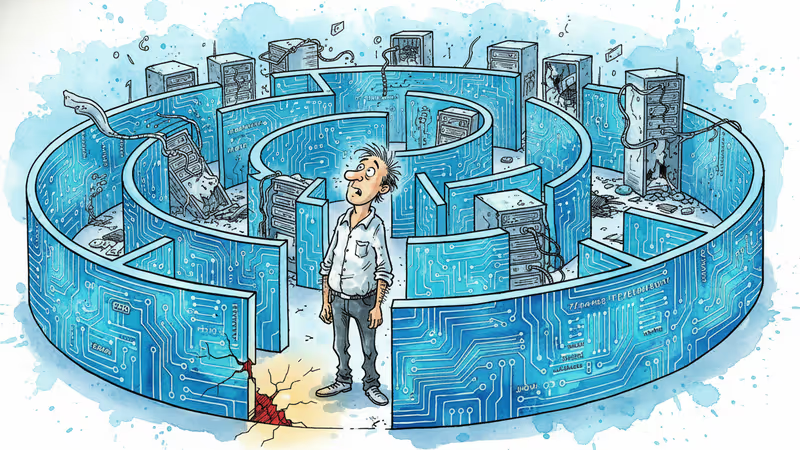
48 Hours of Debugging: Hunting Down a React Native Touch Bug
A 48-hour journey tracking down an intermittent iOS touch bug. Four hypotheses, systematic testing, and discovering the React Native New Architecture trap.
An intermittent bug, four hypotheses, and an architectural trap
The App Stopped Responding
"The buttons aren't working."
I was testing the PRISM app when I noticed the table of contents button on the article detail screen wasn't responding. Neither was the back button. The language switcher, the like button, the comment input—all dead. Strangely, scrolling still worked. I could swipe up and down just fine, but tapping any button did absolutely nothing.
Force-quitting and restarting the app would fix it temporarily. But after navigating through a few articles, everything would freeze again. There was no discernible pattern. It seemed completely random.
I've spent years working on test automation, so I know that even seemingly random bugs reveal patterns if you run enough tests.
Building an App with AI
I built almost all of the PRISM app using Claude Code. Not because I'm a React Native expert—I'm not. AI made it possible. I'd say "build this feature" and code would appear. Most of it worked. Four-language support, push notifications, ad integration, subscription system. Things I never would have attempted before.
Then I hit this touch bug. "Touches aren't registering. Any idea why?" The AI offered several hypotheses and suggested we test them one by one. The problem was, the AI didn't actually know the cause either.
First Attempt: Gesture Handler Conflict
The AI's first hypothesis was a gesture conflict. "You're using @gorhom/bottom-sheet for the table of contents, and there might be nested GestureHandlerRootView components causing a conflict."
It sounded plausible. I'd actually disabled the TOC feature before due to gesture conflicts. I replaced the Bottom Sheet with React Native's built-in Modal. The result? Still broken.
Second Attempt: Ad Overlay
The second hypothesis was the ad system. "Maybe a transparent overlay from the interstitial ad is remaining after it closes and blocking touches?"
We were using Google AdMob, and iOS native ads create a separate UIWindow. It did seem like the problem occurred more often after ads appeared. I completely disabled ads and tested again. The frequency dropped, but the bug still occurred. Ads might have been making it worse, but they weren't the root cause.
Finding the Pattern: 14-15 Screen Transitions
Even random-looking bugs have patterns. I ran dozens of repeated tests, changing one variable at a time. No issues right after app launch. A few articles were fine. But after 14-15 screen transitions, the bug would appear. There was a clear correlation between the number of screen transitions and the bug.
Based on this discovery, I asked the AI: "Could touch handlers from previous screens be persisting without being properly released?" I tried setting detachInactiveScreens: true to detach inactive screens. The frequency dropped, but it still happened. This was just masking the symptom, not fixing the root cause. But now I was certain that screen transitions were the key variable.

The Turning Point: Asking a Different Question
On day two, something shifted in my thinking. "What if it's not my code?"
I'd been assuming the bug was in my code or the libraries I was using. But what if it was a bug in React Native itself? I took another look at the project configuration.
// ios/Podfile.properties.json
{
  "newArchEnabled": "true"
}
New Architecture. Fabric. React Native's new rendering system, enabled by default in Expo SDK 54.
I told the AI to search GitHub Issues for similar cases. It found them.
- #37755 - "Touch events stop working intermittently on iOS with Fabric"
- #38511 - "RCTSurfaceTouchHandler sometimes fails to register touches"
The symptoms matched exactly. Intermittent. iOS only. More frequent after screen transitions. Scrolling works but taps don't.
The AI found it, but I was the one who decided to search GitHub. AI doesn't go looking through community forums unless you tell it to.
The Fix: Rolling Back the Architecture
I turned off New Architecture.
{
  "newArchEnabled": "false"
}
I also removed libraries that might conflict with this change.
npm uninstall react-native-reanimated react-native-worklets @gorhom/bottom-sheetI replaced Reanimated with the built-in Animated API, and Bottom Sheet with the built-in Modal. Rebuilt for iOS and tested. Over 50 screen transitions. Zero touch issues.
What I Learned
1. When bugs are intermittent, suspect the architecture
If a bug is hard to reproduce and seems random, it's probably not a code-level issue. It could be a race condition, a memory problem, or a framework bug. If you're stuck for more than two days, look one level higher.
2. Dependencies have costs
react-native-reanimated and @gorhom/bottom-sheet are great libraries. But they include native code, which makes them vulnerable to architectural changes. If the built-in APIs are sufficient, think twice before adding external dependencies.
3. Systematic documentation leads to answers
I followed a cycle: hypothesis, test, document, next hypothesis. I documented even the failed hypotheses. That documentation is what allowed me to eventually ask, "So what's left?"
4. AI is an assistant
AI proposes hypotheses, writes code, and suggests testing approaches. But the decision to change direction—"let's ask a different question"—was mine. AI is a powerful tool, but it's still just a tool.
Final Thoughts
These 48 hours of debugging showed me both the potential and the limits of AI-assisted coding. You can build an app without deep domain expertise. But when bugs hide deep in the framework, you're the one who has to dig them out.
Even in an age where AI writes code for you, developers aren't becoming obsolete. Quite the opposite. AI handles the "how." But "what's the problem," "where should I look," and "when should I change direction"—those are still human decisions. Coding time has decreased, but judgment has become more important than ever.
In this bug hunt, the AI proposed four hypotheses. All four were wrong. The breakthrough came when I decided to ask a different question. That's something AI can't do for you.
To anyone facing a similar situation: change the question. Look one level higher. Search the community. And document everything.
January 2026
Authors

"17 years in the field, now telling the story of technology"
Related Articles
Trump announced substantial progress on a US-Iran peace deal and Hormuz reopened after six weeks. Bitcoin jumped from $74,000 to $76,700 in four hours. Xi seated Putin, Iran, and India at the same desk in one week. SpaceX opened its books for the first time in 23 years with the largest IPO in U.S. history; Nvidia conceded China to Huawei. BTS held the Billboard 200 top 10 for an eighth straight week.
Trump and Xi met in Beijing for the first time in nine years. Microsoft poured $100B into OpenAI and became the supporting actor; Cerebras received $70B on day one. Hormuz entered week six. Cisco cut 4,000. ILLIT hit Billboard No. 1, CORTIS debuted at No. 3, and BTS is confirmed for the World Cup Final halftime stage.

A closed Hormuz arrives at the kitchen table, Musk vs. Altman puts a trillion dollars on trial, the Big Four bet $650 billion on AI, and Trump sends 25% tariff invoices to long-time allies. K-pop's seventeen-year slave-contract era closes with a standard-contract reform.

Tim Cook's 25-year goodbye, $40 billion poured into Anthropic, shots near the White House dinner, and TXT's first Grand Slam — a week of power handed over and crises distributed.
Trump announced substantial progress on a US-Iran peace deal and Hormuz reopened after six weeks. Bitcoin jumped from $74,000 to $76,700 in four hours. Xi seated Putin, Iran, and India at the same desk in one week. SpaceX opened its books for the first time in 23 years with the largest IPO in U.S. history; Nvidia conceded China to Huawei. BTS held the Billboard 200 top 10 for an eighth straight week.
Trump and Xi met in Beijing for the first time in nine years. Microsoft poured $100B into OpenAI and became the supporting actor; Cerebras received $70B on day one. Hormuz entered week six. Cisco cut 4,000. ILLIT hit Billboard No. 1, CORTIS debuted at No. 3, and BTS is confirmed for the World Cup Final halftime stage.
A closed Hormuz arrives at the kitchen table, Musk vs. Altman puts a trillion dollars on trial, the Big Four bet $650 billion on AI, and Trump sends 25% tariff invoices to long-time allies. K-pop's seventeen-year slave-contract era closes with a standard-contract reform.
Tim Cook's 25-year goodbye, $40 billion poured into Anthropic, shots near the White House dinner, and TXT's first Grand Slam — a week of power handed over and crises distributed.
Thoughts
1 thoughts
Share your thoughts on this article
Sign in to join the conversation